Automations
WOML vs n8n: Visual Workflows or Readable Source?
WOML vs n8n: Compare visual and code-first workflow automation, including developer experience, integrations, durability, AI agents, and use cases.
Visual workflow builders make automation feel approachable. Connect a trigger to an API, add a condition, route the result somewhere useful, and suddenly a process that once required custom software is running on its own.
It's easy to see why tools like n8n have become popular. Instead of starting with code, you start with a canvas. Each node represents an action, and the connections show how information moves through the system.
But there's another way to approach workflow automation: What if the workflow itself were readable source code?
That's the idea behind WOML, an open-source workflow language and runtime that uses HTML-inspired markup and JavaScript to describe and execute automated processes.
Both WOML and n8n can automate tasks, connect services, and execute multi-step processes. The difference lies in how you build, understand, and maintain those workflows.
And that difference matters more as your automation becomes part of a real software system.
What Is the Difference Between WOML and n8n?
n8n is a visual workflow automation platform. WOML is a code-first workflow language with a durable execution runtime.
In n8n, you build workflows by connecting nodes on a canvas. Each node performs an operation, such as calling an API, transforming data, evaluating a condition, or interacting with another application.
In WOML, you describe the same kind of process in a .woml file. Markup defines the workflow's structure, while JavaScript handles the logic inside individual steps. A runtime manages execution, state, retries, and recovery.
Neither approach is universally better.
n8n is particularly attractive when you want to connect existing applications quickly, explore an automation visually, or collaborate with people who don't write software.
WOML is designed for developers who prefer working in their editor, keeping workflows alongside application code, and treating automation as a maintainable part of their software architecture.
Here's how their approaches compare:
| Capability | n8n | WOML |
|---|---|---|
| Primary interface | Visual node editor | Readable markup and JavaScript |
| Workflow definition | Graph of configured nodes | .woml source files |
| Custom logic | JavaScript/Python Code nodes | JavaScript steps and local modules |
| Version control | Built-in history and Git integration on supported plans | Native source-file Git workflow |
| Integrations | Large library of ready-made connectors | Built-in services, APIs, modules, and providers |
| Execution reliability | Retries, error workflows, execution history | Durable execution, retries, recovery, and policies |
| AI agents | Visual AI nodes and integrations | Code-first agent workflows and AI coding skill |
| Deployment | Managed cloud or self-hosted | Local or self-hosted runtime |
| Best suited to | Visual automation and integration-heavy workflows | Developer-owned automation and workflow applications |
The interesting question isn't which tool has more features. It's which approach fits the way you want to build and maintain software.
The Appeal of Visual Workflows
Imagine you're automating a customer onboarding process.
A new customer signs up. You create a record in your CRM, send a welcome email, notify your team in Slack, and schedule a follow-up.
In n8n, that process might look something like this:
Rendering diagram…
Diagram source
flowchart TD
    A["New Customer Signup"] --> B["Create CRM Record"]
    B --> C["Send Welcome Email"]
    C --> D["Notify Slack"]
    D --> E["Schedule Follow-up"]

    classDef trigger fill:#DBEAFE,stroke:#3B82F6,color:#1E40AF
    classDef action fill:#F1F5F9,stroke:#94A3B8,color:#334155
    class A trigger
    class B,C,D,E action
Each box corresponds to a node in the visual editor. You select the services you need, configure their inputs, and connect the nodes.
For this kind of workflow, the visual approach is genuinely useful.
You can understand the overall process without reading code. You can inspect individual steps, see how data flows through the workflow, and make changes using a graphical interface.
n8n also provides prebuilt integrations for hundreds of applications, saving you from implementing every API interaction yourself.
For business automation, internal tools, and connecting SaaS applications, those conveniences can significantly reduce development time.
When Visual Simplicity Becomes Visual Complexity
Now imagine the onboarding process evolves.
Different customers need different onboarding paths. Enterprise accounts require approval. Failed CRM updates must be retried. Some operations run in parallel. Others depend on previous results.
Your simple workflow might grow into dozens of nodes, multiple branches, and nested sub-workflows.
A visual canvas can still represent that complexity. But it doesn't necessarily make the complexity disappear.
You may need to navigate between nodes to understand configuration details, inspect expressions to understand data transformations, and follow connections to determine which conditions lead to which actions.
This isn't a limitation unique to n8n. It's a tradeoff inherent in visual programming.
A diagram can make the shape of a process easier to understand, while making its implementation details harder to see all at once.
For developers accustomed to reading source code, that creates an interesting question:
Would the same workflow be easier to maintain if its structure and logic lived together in a readable file?
WOML's Approach: A Workflow You Can Read Like Code
WOML starts with a different assumption: developers should be able to understand an automation by reading its source.
Rather than building the workflow through a visual editor, you describe its steps using markup that resembles HTML.
Here's a small example that processes an order:
<woml>
  <workflow
    id="process-order"
    name="Process an order"
    version="1.0.0"
  >
    <triggers>
      <manual id="start" />
    </triggers>

    <steps>
      <step id="prepareOrder">
        <script>
          return {
            orderId: "ORD-1024",
            subtotal: 120
          };
        </script>
      </step>

      <step id="calculateTotal">
        <script>
          const order = context.steps.prepareOrder;

          return {
            orderId: order.orderId,
            total: order.subtotal * 1.2
          };
        </script>
      </step>

      <step id="confirmation">
        <script>
          return {
            message: "Order processed",
            total: context.steps.calculateTotal.total
          };
        </script>
      </step>
    </steps>
  </workflow>
</woml>
Even without knowing WOML, you can follow what happens.
A manual trigger starts the workflow. The first step prepares an order. The second calculates its total, and the final step creates a confirmation.
The structure is markup. The business logic is JavaScript.
Notice that the workflow doesn't require a sequence of framework calls to describe its execution. The order of operations is visible directly in the document.
WOML's runtime interprets that definition, executes the steps, and records their results.
You can validate and run the example from your terminal:
woml check order.woml
woml run order.woml
The check command validates the workflow's structure and references before execution. The run command starts it.
This is an intentionally small example, but the same model can describe scheduled tasks, webhook-driven applications, parallel work, human approvals, and more complex automation.
For a complete introduction, see the WOML Quick Start.
Readable Source Changes How Developers Work
The most important difference between n8n and WOML isn't how workflows look on the screen.
It's what happens when a team starts treating those workflows as software.
Consider a developer who needs to modify an automation responsible for deploying an application.
In a visual editor, they may open the workflow, navigate through nodes, update configuration, and inspect the execution paths.
In WOML, they open a source file in their editor.
They can search for a step, inspect its JavaScript, modify a condition, and review the changes using familiar development tools.
That creates some practical advantages.
1. Workflow Changes Become Ordinary Code Reviews
Suppose a developer changes the retry count of an API operation from three to five.
In WOML, that change can appear directly in a Git diff:
- <step id="callApi" retry="3">
+ <step id="callApi" retry="5">
A reviewer immediately sees what changed.
They don't need to reconstruct the difference between two visual configurations.
This doesn't mean n8n lacks version control. n8n supports workflow history and Git-backed source control, with Git-based environment management available on supported paid plans.
The distinction is that WOML's primary authoring format is already a human-readable source document.
You don't need to convert a graphical workflow into something developers can review. The source is the workflow.
2. Your Editor Becomes Your Workflow Development Environment
Developers already have tools they use every day: code search, Git, terminal commands, language tooling, and coding assistants.
With WOML, those tools can participate naturally in workflow development.
A workflow can live in the same repository as the application that depends on it. Its changes can move through pull requests, CI checks, and deployment processes.
WOML also provides a VS Code extension and command-line validation.
For teams that already organize their work around source-controlled repositories, this approach can feel more natural than managing a separate visual automation environment.
3. Workflow Structure and Logic Stay Close Together
A visual workflow may show that one node connects to another, but understanding what happens inside those nodes often requires opening their configurations.
WOML keeps the high-level flow and its implementation in the same document.
The markup describes what happens and when. JavaScript describes what an individual step does.
That separation is deliberate.
It makes the process readable without restricting developers to a fixed collection of predefined actions.
Of course, readable source isn't automatically good source. A poorly structured WOML file can become difficult to maintain, just as a poorly organized visual workflow can.
Naming, composition, reusable modules, and clear boundaries still matter.
What About Reliability and Long-Running Workflows?
The authoring experience is only part of the comparison.
Once workflows begin handling important operations, you need to think about what happens when something goes wrong.
An API times out. A worker crashes. A deployment succeeds halfway through. A human approval takes hours instead of seconds.
These are execution problems, not interface problems.
Both n8n and WOML provide ways to manage failures, but their underlying execution models deserve attention.
n8n: Execution History, Retries, and Error Handling
n8n supports node-level retries, error workflows, execution history, waiting, and retrying failed executions.
Its interface makes it convenient to inspect previous runs, identify failed operations, and debug data moving between nodes.
That visibility is particularly valuable for operational teams who want to investigate failures from a dashboard.
WOML: Durability as Part of the Execution Model
WOML is built around a durable Rust execution engine.
The runtime records workflow progress and step results, allowing execution to be inspected and recovered according to its supported recovery semantics.
It also provides runtime-level capabilities for retries, durable waits, external signals, locks, compensation, and human approvals.
Consider a deployment process:
Rendering diagram…
Diagram source
flowchart TD
    A["Validate Configuration"] --> B["Create Backup"]
    B --> C["Deploy New Version"]
    C --> D["Run Health Check"]
    D --> E{"Is Deployment Healthy?"}
    E -->|Yes| F["Deployment Complete"]
    E -->|No| G["Run Compensation"]
    G --> H["Restore Previous Version"]
    H --> I["Deployment Failed"]

    classDef action fill:#DBEAFE,stroke:#3B82F6,color:#1E40AF
    classDef decision fill:#FEF3C7,stroke:#D97706,color:#92400E
    classDef success fill:#DCFCE7,stroke:#16A34A,color:#166534
    classDef failure fill:#FEE2E2,stroke:#DC2626,color:#991B1B

    class A,B,C,D action
    class E decision
    class F success
    class G,H,I failure
This process has several responsibilities beyond running commands.
It needs to preserve the outcome of completed steps, make failures visible, prevent conflicting operations, and potentially run compensating actions when a later step fails.
WOML provides explicit primitives for these responsibilities, allowing developers to express them as part of the workflow rather than constructing all the coordination themselves.
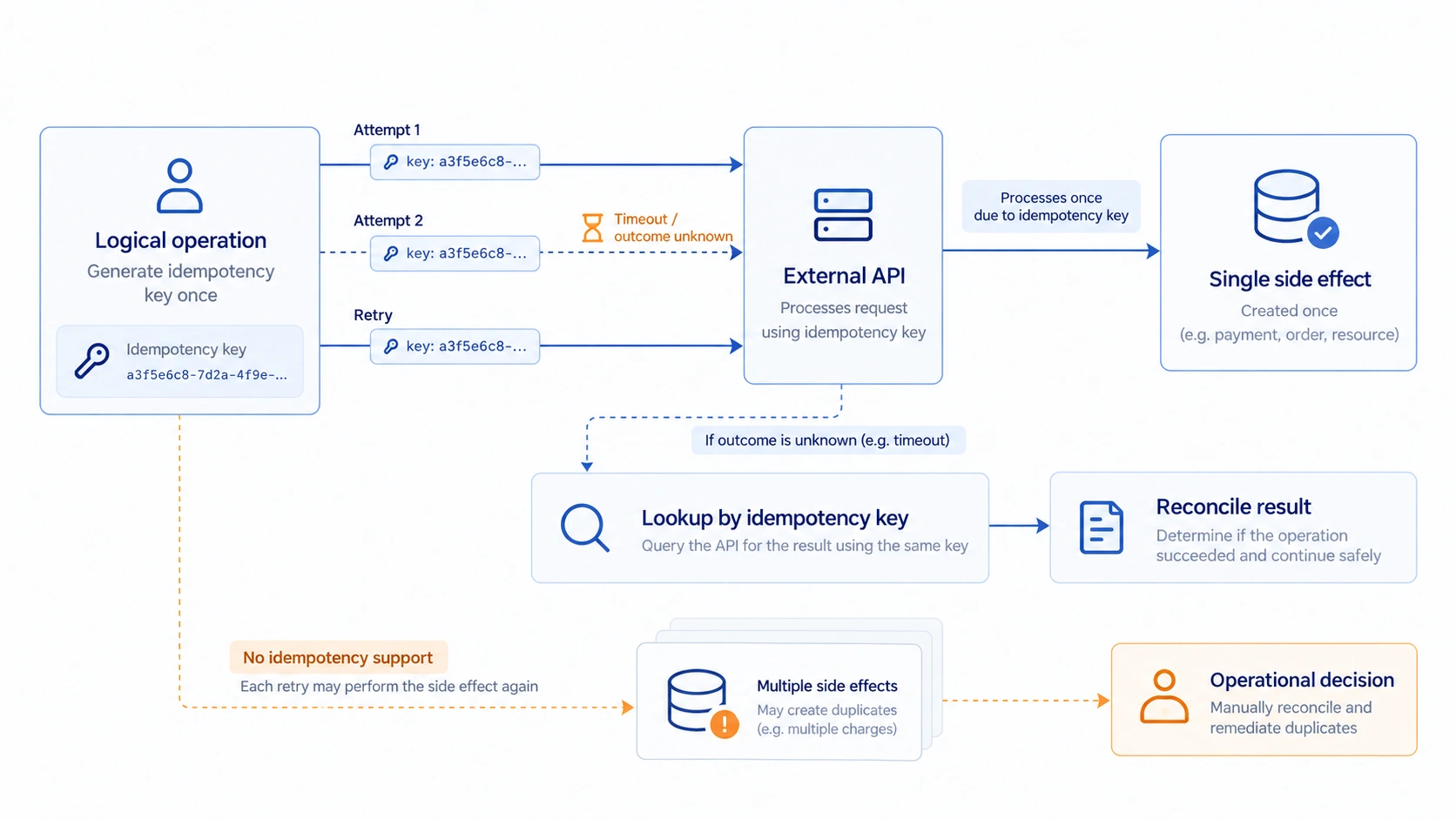
Importantly, durable execution does not make external side effects magically safe.
Retrying a payment, deployment, or database operation still requires appropriate idempotency and recovery design. Compensation isn't the same as an atomic rollback.
WOML's advantage is that these operational concerns have a place in the programming and execution model.
See Durability and Recovery and Retries and Idempotency for more detail.
Integration Libraries vs Programming Flexibility
This is an area where n8n has a clear practical advantage.
If you want to connect Slack, Google Sheets, a CRM, an email provider, and several other SaaS applications, n8n's integration library can save considerable work.
Instead of researching each API, you configure nodes that already understand the services.
WOML takes a more developer-oriented approach.
It provides built-in capabilities for operations such as HTTP requests, database access, object storage, events, state management, and workflow communication.
Developers can also use JavaScript and local modules to implement application-specific logic and integrate external services.
This offers flexibility, but it's not the same as having a ready-made integration for every popular SaaS product.
If your workflow is primarily about connecting business applications, n8n may be the faster route.
If the process involves custom APIs, application-specific logic, infrastructure operations, or deeply integrated backend behavior, WOML's code-first approach may become more attractive.
The right choice depends on how much of your workflow is integration configuration and how much is actual software logic.
Building AI Agents: Visual Orchestration or Source-Controlled Execution?
AI agents introduce another dimension to workflow automation.
A simple agent might receive a request, call an LLM, use a tool, and return a response.
A production agent may need to coordinate multiple services, preserve state, handle failures, wait for approval, and resume work later.
n8n provides visual AI workflow capabilities, including integrations for models, tools, and agent orchestration.
That makes it convenient to experiment with AI-powered automation, particularly when the agent needs to interact with existing business applications.
WOML approaches agents as workflows expressed in source code.
An LLM call can be one supervised step inside a larger process. Other steps can interact with APIs, evaluate results, update state, coordinate child workflows, or request human approval.
This is useful when an AI agent needs to operate as part of an existing engineering system rather than as a standalone visual automation.
You Don't Have to Write Every WOML Workflow Manually
One objection to code-first automation is that developers must learn a new language before they can become productive.
WOML addresses part of that friction through its AI coding skill.
The skill gives compatible coding agents knowledge of WOML's syntax, services, runtime rules, and workflow patterns.
You can describe the automation you want in natural language and ask your coding agent to generate the corresponding .woml file.
For example:
Create a workflow that checks the health of three services every five minutes. Run the checks in parallel, retry failed requests, and return a combined health report.
The coding agent can use the WOML skill to produce a workflow, identify required configuration, and validate its structure.
You still need to review the generated logic and test its behavior, particularly for workflows with external side effects.
But the important shift is that writing a new workflow language doesn't necessarily mean typing every line yourself.
The result remains readable source that developers can inspect and maintain.
Where n8n Is the Better Choice
WOML's source-first design isn't an argument against visual automation.
There are situations where n8n is simply a more appropriate tool.
Choose n8n when:
- You want to connect existing SaaS applications with minimal custom development.
- Your team includes non-developers who need to build or maintain automations.
- You prefer a visual interface for configuring, debugging, and inspecting workflows.
- You want an established library of integrations and reusable templates.
- You need a managed cloud service rather than operating the runtime yourself.
These aren't minor conveniences. They can have a significant effect on how quickly a team delivers useful automation.
For example, a marketing team connecting form submissions to a CRM and an email platform may have little reason to adopt a new workflow language.
A visual builder already solves the problem effectively.
Where WOML Is the Better Choice
WOML becomes particularly interesting when automation belongs to the software engineering process itself.
Consider WOML when:
- Your workflows need to be reviewed and maintained as source code.
- You want automation to live alongside your application's implementation.
- Your processes involve custom JavaScript, backend services, or infrastructure tools.
- Durable state, execution recovery, approvals, and policies are important.
- You prefer local development and self-hosted execution.
- You want AI coding agents to generate workflows that remain readable and reviewable.
Imagine a backend team building an order-processing system.
The system receives payment webhooks, validates requests, records events, starts fulfillment, notifies downstream services, and handles failures.
The team already uses source control, automated tests, and application deployment pipelines.
For this team, describing the workflow in a .woml file can fit naturally into the way the rest of the system is developed.
The workflow doesn't have to become a separate visual artifact maintained outside the codebase.
It becomes another part of the software.
Where WOML Still Has Limitations
WOML is also a younger technology with deliberate boundaries.
Its current runtime doesn't provide a managed distributed multi-node control plane. It doesn't offer n8n's extensive catalog of prebuilt integrations, and its scripting environment doesn't support arbitrary npm package imports.
Some advanced control-flow patterns and custom extension points are also not yet supported.
These constraints are important when evaluating WOML for production use, especially if your architecture requires active-active distributed coordination or relies heavily on existing third-party connectors.
The current limitations documentation describes these boundaries explicitly.
Choosing a workflow engine means evaluating both what it supports and what your application actually requires.
Can WOML and n8n Work Together?
Yes. The two approaches don't have to compete for every workflow in an organization.
A team might use n8n to connect business-facing applications and WOML to execute developer-owned backend or infrastructure processes.
For example, n8n could receive a request from a CRM and send a webhook to a WOML-powered backend workflow.
WOML could then execute a custom process with its own state, retry policies, and recovery behavior, before returning a result or publishing an event.
That architecture allows each tool to operate where its strengths are most useful.
However, introducing both systems also introduces additional operational complexity. You now have two runtimes, two execution histories, and an integration boundary to maintain.
For a small automation, using one tool is usually simpler.
A mixed architecture makes more sense when the separation between business integrations and developer-owned execution is already meaningful.
The Real Question: How Should Workflows Be Maintained?
The most useful way to compare n8n and WOML is to consider the life of an automation after its first successful run.
Who will modify it six months from now?
How will someone review a change to its retry behavior?
Can the team understand the process without depending on the person who built it?
What happens when an external service fails halfway through execution?
And does the workflow belong primarily to business operations, or has it become a component of the application's architecture?
n8n answers these questions through a visual automation platform with a growing set of development and operational capabilities.
WOML answers them through readable source, familiar development workflows, and a durable execution runtime.
The difference isn't simply dragging nodes versus writing markup.
It's the difference between a workflow that developers can inspect visually and a workflow that developers can maintain as executable source.
Both models have their place.
If you want fast, integration-heavy automation with a visual development experience, n8n is a compelling choice.
If you want workflows to behave more like the rest of your codebase-readable, version-controlled, programmable, and executable through a durable runtime, WOML offers a different direction worth exploring.
Build Your First Workflow with WOML
Want to see what source-first automation feels like?
Explore WOML, follow the Quick Start, or browse the documentation to build your first workflow using readable markup and JavaScript.
Start with a small automation, run it locally, and see whether working with workflows as source code fits the way you build software.
Topics
- n8n alternative
- code-first workflow automation
- visual workflow builder
- workflow automation for developers