Infrastructure
The Real Operational Cost of Self-Hosting a Workflow Runtime
Discover the real cost of self-hosting a workflow engine, from infrastructure and maintenance to failure recovery, monitoring, security, and upgrades.
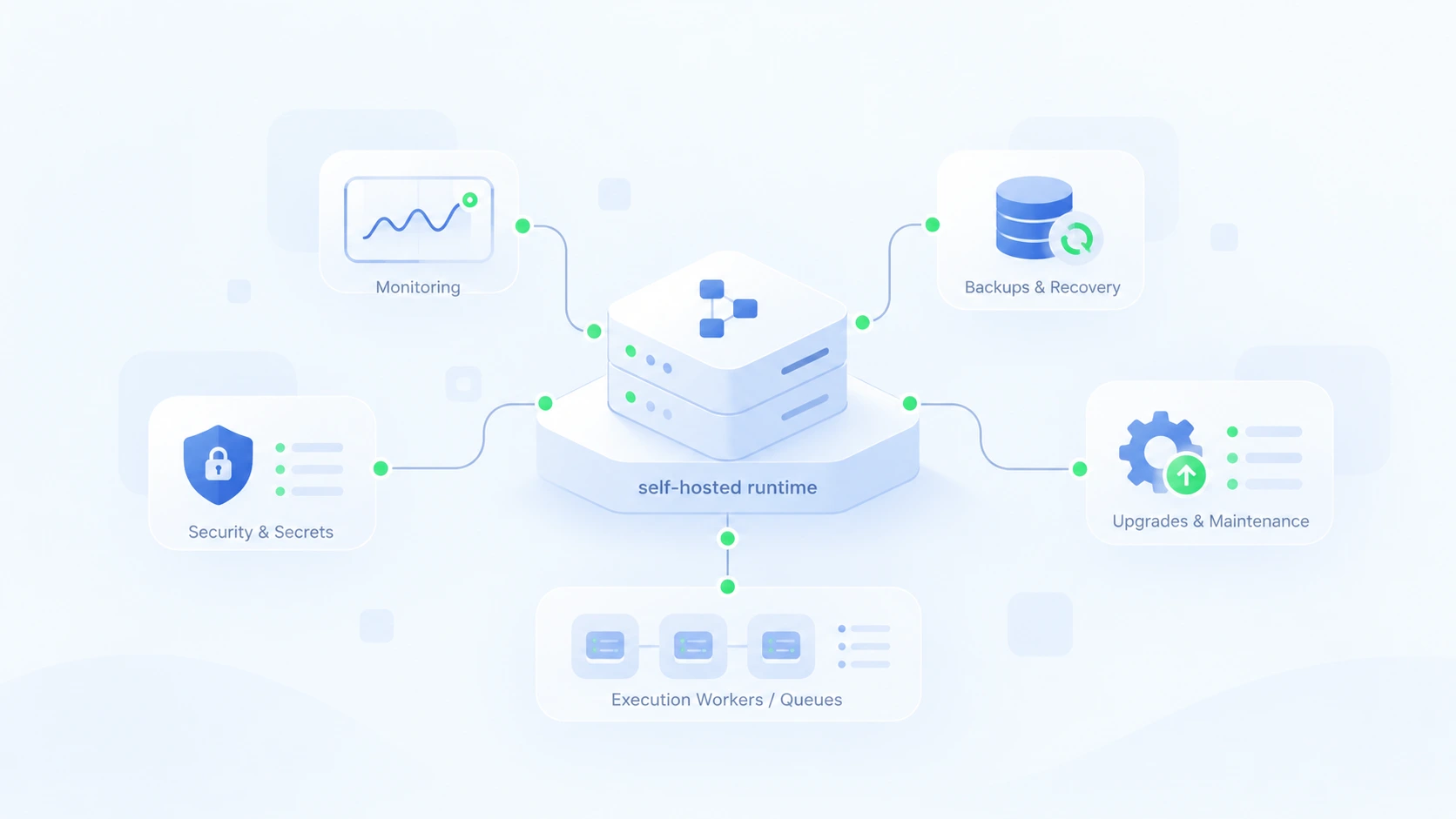
Getting a workflow engine running is often surprisingly easy. Pull a Docker image, configure a database, start a worker, and execute your first workflow. Within an afternoon, you have a system that can coordinate jobs, call APIs, and automate processes.
Then comes production.
A worker crashes halfway through an order. A database migration needs to run while thousands of workflows are active. An external API times out after processing a payment, leaving you unsure whether retrying will charge the customer twice.
Suddenly, running the workflow engine is no longer the difficult part. Operating it reliably is.
Self-hosting offers genuine advantages: infrastructure control, data ownership, deployment flexibility, and potentially lower platform costs. But the monthly server bill tells only a fraction of the story.
The real cost includes everything required to keep workflows running, recover them when they fail, and maintain the system as your applications evolve.
1. You're Hosting More Than a Workflow Engine
A workflow runtime rarely operates in isolation.
Even a relatively simple production deployment may involve execution workers, persistent storage, scheduling, monitoring, secrets, and backup infrastructure.
Each component introduces operational decisions.
Where is execution state stored? What happens when a worker disappears? Can two workers safely process the same task? How do you restore the system after losing its primary database?
Consider a typical self-hosted architecture:
Rendering diagram…
Diagram source
flowchart TD
    A["Workflow Runtime"] --> B["Execution Workers"]
    A --> C["Persistence Layer"]
    A --> D["Scheduling & Queues"]
    A --> E["Monitoring & Logs"]
    A --> F["Security & Secrets"]
    C --> G["Backup & Recovery"]

    classDef main fill:#DCFCE7,stroke:#16A34A,color:#14532D
    classDef component fill:#EFF6FF,stroke:#93C5FD,color:#1E3A8A
    class A main
    class B,C,D,E,F,G component
_Figure 1: Common operational responsibilities around a self-hosted workflow runtime. Depending on the architecture, several components may be integrated rather than deployed separately._
Not every engine needs this many independent services. Some bundle scheduling, execution, and persistence into a simpler runtime. Others require distributed infrastructure to support high throughput and availability.
That distinction matters.
A system with fewer moving parts can reduce configuration, upgrades, networking, and failure scenarios. But a simpler architecture may also have different scaling and availability limits.
The goal isn't to minimize components at any cost. It's to avoid complexity your workload doesn't need.
2. Failure Recovery Is Where Complexity Gets Expensive
Imagine a workflow responsible for processing an online order:
- Charge the customer's payment method.
- Update the order status.
- Send a confirmation email.
The payment API processes the charge successfully. Before the workflow records the result, the worker crashes.
When execution resumes, the system faces an uncomfortable question:
Did the payment succeed?
If it automatically retries the request, the customer might be charged twice. If it skips the operation, an unpaid order might continue through fulfillment.
This is where workflow durability becomes important.
A durable runtime preserves execution progress so completed work doesn't simply disappear when a process restarts. Depending on the engine, this involves persisted events, checkpoints, step results, and recovery policies.
But durability alone doesn't guarantee safe external operations.
A payment provider doesn't necessarily know that your workflow restarted. If the response was lost, your runtime cannot infer the payment outcome merely from its local state.
The workflow needs an idempotency key, a way to query the provider for the operation's outcome, or a reconciliation process.
Rendering diagram…
Diagram source
flowchart TD
    A["Start Payment Workflow"] --> B["Call Payment API"]
    B --> C["Runtime Crashes"]
    C --> D["Recover Execution State"]
    D --> E{"Payment outcome known?"}
    E -->|Succeeded| F["Continue Without Recharging"]
    E -->|Failed before charge| G["Retry Safely"]
    E -->|Unknown| H["Reconcile With Provider"]
    H --> I{"Outcome resolved?"}
    I -->|Yes| J["Continue Based on Result"]
    I -->|No| K["Manual Review"]

    classDef failure fill:#FEE2E2,stroke:#DC2626,color:#991B1B
    classDef decision fill:#FEF3C7,stroke:#D97706,color:#92400E
    classDef safe fill:#DCFCE7,stroke:#16A34A,color:#166534
    class C,K failure
    class E,I decision
    class F,G,J safe
_Figure 2: A safe recovery strategy distinguishes confirmed outcomes from ambiguous external side effects._
Without suitable runtime support, developers often build their own coordination mechanisms: execution-status tables, retry schedulers, distributed locks, recovery scripts, and manual intervention procedures.
Those mechanisms require testing, maintenance, and incident response.
A durable workflow engine can reduce this custom infrastructure. It cannot eliminate the need to design safe business operations.
3. Monitoring a Server Isn't the Same as Monitoring a Workflow
Your monitoring dashboard shows healthy CPU usage, sufficient memory, and a responsive HTTP endpoint.
Everything looks fine.
Meanwhile, 300 workflows are waiting on an unavailable external service, several jobs are repeatedly failing, and an important approval has been pending for two days.
The infrastructure is healthy. The business process isn't.
Workflow observability needs to answer questions that traditional server monitoring cannot:
- Which executions are stuck, failed, or repeatedly retrying?
- Which step caused an execution to stop?
- How long have workflows been waiting?
- Which external operation produced an uncertain outcome?
- Can an operator safely resume execution?
Metrics are useful for detecting patterns. Execution histories explain what happened. Correlated traces help connect workflow steps to external services and infrastructure events.
Without that visibility, incident response becomes investigative work: searching logs, reconstructing timestamps, comparing database records, and guessing which operations completed.
That engineering time is part of the cost of self-hosting.
Observability also needs maintenance. Logs require retention policies, telemetry pipelines can fail, and excessive tracing can generate its own storage bill.
A reliable runtime should make workflow behavior observable, but operators still need to configure monitoring and respond to what it reveals.
4. Upgrades, Backups, and Security Never Stop
Deploying a runtime once is straightforward. Keeping it updated while preserving active workflows is more demanding.
Consider a workflow that waits three days for customer approval.
During those three days, your team deploys a new version of the workflow and upgrades the execution engine.
What happens to the waiting execution?
Can it resume using the original definition? Will the new version interpret its persisted state correctly? Does the upgrade require a database migration?
These questions require explicit versioning and compatibility strategies.
Backups introduce similar concerns.
Copying a database file is not necessarily enough to recover a working system. You need consistent execution state, access to the correct secrets and configuration, and a tested restoration procedure.
Security adds another continuing responsibility: rotating credentials, restricting runtime permissions, auditing privileged operations, and keeping dependencies patched.
None of these tasks is especially glamorous. All become important when workflows handle production infrastructure or customer data.
The cost isn't just performing maintenance. It's proving that maintenance won't interrupt the processes your organization depends on.
5. The Biggest Cost Usually Isn't the Server Bill
Suppose a small team runs its workflow infrastructure on a $100-per-month server.
At first glance, that's $1,200 annually. Compared with a managed service, self-hosting might look inexpensive.
But now consider the engineering work.
Someone must monitor executions, investigate failures, apply upgrades, maintain backups, and occasionally restore or repair workflows.
A simple total-cost model looks like this:
Total Cost = Infrastructure + Engineering Time + Incident Cost
Consider an illustrative scenario:
| Expense | Annual cost |
|---|---|
| Hosting and storage ($100/month) | $1,200 |
| Maintenance (4 hours/week at $75/hour) | $15,600 |
| Incident response (20 hours at $75/hour) | $1,500 |
| Total | $18,300 |
These aren't industry benchmarks. They're hypothetical figures intended to demonstrate how the calculation changes when engineering time is included.
And the formula still doesn't capture everything.
An engineer debugging a stuck workflow isn't working on product features. A deployment delayed by unreliable automation has consequences beyond infrastructure spending.
This doesn't mean managed workflow services are automatically cheaper. Their pricing can become significant at scale, and organizations with existing infrastructure teams may operate self-hosted systems efficiently.
The important question is not simply, "How much does the server cost?"
It's "How much engineering attention does this system require to operate reliably?"
That number often matters more.
6. How to Reduce the Operational Burden
The most effective way to reduce operational cost is to avoid creating unnecessary coordination infrastructure in the first place.
Start by matching the runtime architecture to your actual requirements. A single-host execution engine may be sufficient for internal automation. A mission-critical distributed platform may require redundancy, stronger isolation, and more sophisticated deployment procedures.
Then choose an execution model that provides the reliability primitives your workflows need.
For example, WOML is an open-source workflow language and runtime that lets developers describe processes using readable, HTML-inspired markup and JavaScript.
Rather than manually implementing every scheduling, retry, and recovery mechanism, developers can express workflow behavior using runtime-managed capabilities.
WOML includes durable execution, supervised external operations, retries, waits and signals, locks, compensation, approvals, and execution inspection.
These features can replace recurring application-level coordination code.
A deployment workflow, for instance, can use the runtime to supervise external commands, persist progress, and coordinate a recovery process when an operation fails.
The advantage isn't that the infrastructure becomes maintenance-free. It's that developers have fewer custom mechanisms to build and maintain.
WOML also keeps workflows in ordinary source files, allowing teams to review changes through Git and manage automation alongside application code.
However, architectural simplicity has boundaries.
WOML is self-hosted, not a managed cloud service, and its current runtime doesn't provide a distributed multi-node control plane. Teams requiring that architecture must account for the limitation rather than assuming the runtime provides transparent high availability.
Regardless of the engine, a practical operational strategy includes testing crash recovery, validating backups, defining safe retry policies, monitoring workflow-level failures, and documenting how operators should intervene.
The best runtime is not necessarily the one with the most features. It's the one whose capabilities and operational requirements match the work you're actually running.
7. When Self-Hosting Is Worth It
Despite its responsibilities, self-hosting can be an excellent decision.
Organizations may need to keep execution data within their own infrastructure, operate in restricted networks, meet specific compliance requirements, or integrate workflows closely with internal systems.
Teams with established platform engineering expertise may also find that self-hosting offers better flexibility and predictable economics.
In those situations, operational ownership isn't necessarily a disadvantage. It may be a requirement.
The important distinction is between responsibilities that provide meaningful control and complexity that exists only because the system requires it.
A well-designed self-hosted runtime should let engineers spend their time improving workflows, not continually rebuilding the infrastructure that keeps them alive.
Conclusion: Own Your Infrastructure, Not Unnecessary Complexity
Self-hosting a workflow runtime isn't inherently expensive or difficult. But its true cost extends far beyond the machine running the engine.
Recovery, monitoring, upgrades, security, and engineering attention all contribute to the long-term investment.
The right approach is to choose an execution model that handles as much recurring coordination as possible while remaining appropriate for your infrastructure and reliability requirements.
Self-hosting should give you control, not an endless collection of operational chores.
If you're exploring a code-first approach to durable workflow execution, WOML offers a different way to build and operate automation on your own infrastructure.
Explore the WOML documentation to see how readable workflow definitions and runtime-managed execution can work together.
Topics
- workflow engine costs
- self-hosted workflow automation
- workflow orchestration
- durable execution
- workflow engine maintenance